




Find out which operating systems, platforms, and devices are supported with PaperCut Hive and Pocket.
If you’re looking to see which printers and MFDs are supported with PaperCut Hive and Pocket, take a look at the Supported Printers page.
Client requirements
PaperCut Hive and Pocket user client software
The client software for PaperCut Hive and Pocket authenticates users, allowing them to print into the system. It is also used for print job routing as well as other important functions. The software is primarily downloaded and installed from one of the following locations, either self-served by the user, or pre-deployed by an Administrator:
- User Portal
- Classic invitation email
- Pre-deployed via a bulk deployment solution
- PaperCut Hive and Pocket Compatibility Tool
Supported Environments and Technologies | Description |
|---|---|
Operating Systems | Windows 10 (64-bit) / 11 / Windows Server 2016 and later
macOS 13 (Ventura) and later |
Arm architecture | Arm64 architecture for Windows and macOS are supported Other devices that support ARM architecture without emulation layers, such as the Raspberry Pi, are not supported. |
Memory | 1GB minimum |
Hard disk | 600MB minimum, plus additional storage for logs |
CPU | Dual core CPU |
Virtual Desktop Infrastructure |
|
ChromeOS | ChromeOS supports printing only. See here for more information |
Running alongside PaperCut NG/MF | Running PaperCut MF/NG alongside Papercut Hive or Pocket will cause issues. We advise against running both of these together on the same computer. |
Ghost Trap | Ghost Trap is a required program that converts PostScript data to PDF, enabling the PaperCut Global PS Driver to support all printer manufacturers. Ghost Trap is also used for thumbnail generation and PDF to URF conversion if a printer supports URF over IPP. The PaperCut Print Client software will install Ghost Trap if it is not detected on the client system. Ghost trap has a dependency on MS Visual C++ 2015-2022 Redistributable (x64). This is also installed automatically if not detected on the client system. GhostTrap download URL (required on Windows Edgenodes to download GhostTrap)
|
Web Admin console and User Portal
Latest stable version of all major browsers are supported
Mobile App
- iOS 17 or later
- Android 13 or later
Firewall and networking
In many networks, PaperCut Hive and Pocket should ‘just work’. However, if you have a more restrictive firewall policy in place, you may need to open the following ports and URLs to get everything working.
Please note, PaperCut Hive and Pocket are hosted in a region of your choice, so please choose the correct location based on your tenancy.
United States (US) data center
If it's allowed, add the following to your firewall:
*.papercut.comfor PaperCut Pocket and Hivestorage.googleapis.comfor Scan to cloud, Cloud Node & Pull Deliverysecuretoken.googleapis.com/*for PaperCut Identity Platform using by PaperCut Pocket/Hiveapis.google.com/*for PaperCut Identity Platform using by PaperCut Pocket/Hiveidentitytoolkit.googleapis.com/*for PaperCut Identity Platform using by PaperCut Pocket/Hivefirestore.googleapis.com/*for get real time updates on the PaperCut Pocket/Hive admin consolegoogleapis.comfor PaperCut Identity Platform using by PaperCut Pocket/Hivepc-pmitc.firebaseio.comfor Firebase realtime DB
Alternatively, you can use the below. They are outbound traffic to the URLs, using port 443 (HTTPS):
pocket.papercut.comfor PaperCut PaperCut Pockethive.papercut.comfor PaperCut PaperCut Hivepmitc.papercut.comfor PaperCut PaperCut Pocket and Hivecloudnode.pmitc.papercut.comfor EdgeNode in PaperCut Pocket and Hiveupdate.pmitc.papercut.comfor EdgeNode auto updatesupdate.cloud.papercut.comfor EdgeNode auto updatesregions.pmitc.papercut.comfor PaperCut Hive region selectionmqtt.notifications.cloud.papercut.comfor MQTT notificationsmqtt2.notifications.cloud.papercut.comfor MQTT notificationsmqtt3.notifications.cloud.papercut.comfor MQTT notificationsstorage.googleapis.comfor Cloud Node document & Pull Deliverysend.papercut.comfor Integrated Scanning in PaperCut Hive\*.printerapp.papercut.comwildcard for embedded applications in PaperCut Hivelogin.papercut.comfor PaperCut Pocket and Hive admin console/user portal Loginsecuretoken.googleapis.comfor PaperCut Identity Platform using by PaperCut Pocket/Hive
Or alternatively use this URL, however, it might change in the future:https://securetoken.googleapis.com/v1/tokenidentitytoolkit.googleapis.comfor PaperCut Identity Platform using by PaperCut Pocket/Hive
Or alternatively use this URL, however, it might change in the future:https://identitytoolkit.googleapis.com/v1/projectsgoogleapis.comfor PaperCut Identity Platform using by PaperCut Pocket/Hive
Or alternatively use this URL, however, it might change in the future:https://www.googleapis.com/identitytoolkit/v3/relyingparty/getProjectConfigpkg.cloud.papercut.comPaperCut update package downloads
Email Delivery Service - SendGrid
IP Address:
168.245.53.86Domain:
papercut.com
Europe (EU) data center
If it's allowed, add the following to your firewall:
*.papercut.comfor PaperCut Pocket and Hivestorage.googleapis.comfor Scan to cloud, Cloud Node & Pull Deliverysecuretoken.googleapis.com/*for PaperCut Identity Platform using by PaperCut Pocket/Hiveapis.google.com/*for PaperCut Identity Platform using by PaperCut Pocket/Hiveidentitytoolkit.googleapis.com/*for PaperCut Identity Platform using by PaperCut Pocket/Hivefirestore.googleapis.com/*for get real time updates on the PaperCut Pocket/Hive admin consolegoogleapis.comfor PaperCut Identity Platform using by PaperCut Pocket/Hivemobile-pc-pmitc-core-eu-prod-1.europe-west1.firebasedatabase.appfor Firebase realtime DB
Alternatively, you can use the below. They are outbound traffic to the URLs, using port 443 (HTTPS):
eu.pocket.papercut.comfor PaperCut PaperCut Pocketeu.hive.papercut.comfor PaperCut PaperCut Hiveeu.pmitc.papercut.comfor PaperCut PaperCut Pocket and Hivecloudnode.eu.pmitc.papercut.comfor EdgeNode in PaperCut Pocket and Hiveupdate.pmitc.papercut.comfor EdgeNode auto updatesupdate.cloud.papercut.comfor EdgeNode auto updatesregions.pmitc.papercut.comfor PaperCut Hive region selectionmqtt.notifications.cloud.papercut.comfor MQTT notificationsmqtt2.notifications.cloud.papercut.comfor MQTT notificationsmqtt3.notifications.cloud.papercut.comfor MQTT notificationsstorage.googleapis.comfor Cloud Node document & Pull Deliveryeu.send.papercut.comfor Integrated Scanning in PaperCut Hive\*.eu.printerapp.papercut.comwildcard for embedded applications in PaperCut Hivelogin.papercut.comfor PaperCut Pocket and Hive admin console/user portal Loginsecuretoken.googleapis.comfor PaperCut Identity Platform using by PaperCut Pocket/Hive
Or alternatively use this URL, however, it might change in the future:https://securetoken.googleapis.com/v1/tokenidentitytoolkit.googleapis.comfor PaperCut Identity Platform using by PaperCut Pocket/Hive
Or alternatively use this URL, however, it might change in the future:
https://identitytoolkit.googleapis.com/v1/projectsgoogleapis.comfor PaperCut Identity Platform using by PaperCut Pocket/Hive
Or alternatively use this URL, however, it might change in the future:https://www.googleapis.com/identitytoolkit/v3/relyingparty/getProjectConfigpkg.cloud.papercut.comPaperCut update package downloads
Email Delivery Service - SendGrid
IP Address:
168.245.53.86Domain:
papercut.com
United Kingdom (UK) data center
If it's allowed, add the following to your firewall:
*.papercut.comfor PaperCut Pocket and Hivestorage.googleapis.comfor Scan to cloud, Cloud Node & Pull Deliverysecuretoken.googleapis.com/*for PaperCut Identity Platform using by PaperCut Pocket/Hiveapis.google.com/*for PaperCut Identity Platform using by PaperCut Pocket/Hiveidentitytoolkit.googleapis.com/*for PaperCut Identity Platform using by PaperCut Pocket/Hivefirestore.googleapis.com/*for get real time updates on the PaperCut Pocket/Hive admin consolegoogleapis.comfor PaperCut Identity Platform using by PaperCut Pocket/Hivemobile-pc-pmitc-core-uk-prod-1.europe-west1.firebasedatabase.appfor Firebase realtime DB
Alternatively, you can use the below. They are outbound traffic to the URLs, using port 443 (HTTPS):
uk.pocket.papercut.comfor PaperCut PaperCut Pocketuk.hive.papercut.comfor PaperCut PaperCut Hiveuk.pmitc.papercut.comfor PaperCut PaperCut Pocket and Hivecloudnode.uk.pmitc.papercut.comfor EdgeNode in PaperCut Pocket and Hiveupdate.pmitc.papercut.comfor EdgeNode auto updatesupdate.cloud.papercut.comfor EdgeNode auto updatesregions.pmitc.papercut.comfor PaperCut Hive region selectionmqtt.notifications.cloud.papercut.comfor MQTT notificationsmqtt2.notifications.cloud.papercut.comfor MQTT notificationsmqtt3.notifications.cloud.papercut.comfor MQTT notificationsstorage.googleapis.comfor Cloud Node document & Pull Deliveryuk.send.papercut.comfor Integrated Scanning in PaperCut Hive\*.uk.printerapp.papercut.comwildcard for embedded applications in PaperCut Hivelogin.papercut.comfor PaperCut Pocket and Hive admin console/user portal Loginsecuretoken.googleapis.comfor PaperCut Identity Platform using by PaperCut Pocket/Hive
Or alternatively use this URL, however, it might change in the future:https://securetoken.googleapis.com/v1/tokenidentitytoolkit.googleapis.comfor PaperCut Identity Platform using by PaperCut Pocket/Hive
Or alternatively use this URL, however, it might change in the future:https://identitytoolkit.googleapis.com/v1/projectsgoogleapis.comfor PaperCut Identity Platform using by PaperCut Pocket/Hive
Or alternatively use this URL, however, it might change in the future:https://www.googleapis.com/identitytoolkit/v3/relyingparty/getProjectConfigpkg.cloud.papercut.comPaperCut update package downloads
Email Delivery Service - SendGrid
IP Address:
168.245.53.86Domain:
papercut.com
Australia (AU) data center
If it's allowed, add the following to your firewall:
*.papercut.comfor PaperCut Pocket and Hivestorage.googleapis.comfor Scan to cloud, Cloud Node & Pull Deliverysecuretoken.googleapis.com/*for PaperCut Identity Platform using by PaperCut Pocket/Hiveapis.google.com/*for PaperCut Identity Platform using by PaperCut Pocket/Hiveidentitytoolkit.googleapis.com/*for PaperCut Identity Platform using by PaperCut Pocket/Hivefirestore.googleapis.com/*for get real time updates on the PaperCut Pocket/Hive admin consolegoogleapis.comfor PaperCut Identity Platform using by PaperCut Pocket/Hivemobile-pc-pmitc-core-au-prod-1.asia-southeast1.firebasedatabase.appfor Firebase realtime DB
Alternatively, you can use the below. They are outbound traffic to the URLs, using port 443 (HTTPS):
au.pocket.papercut.comfor PaperCut PaperCut Pocketau.hive.papercut.comfor PaperCut PaperCut Hiveau.pmitc.papercut.comfor PaperCut PaperCut Pocket and Hivecloudnode.au.pmitc.papercut.comfor EdgeNode in PaperCut Pocket and Hiveupdate.pmitc.papercut.comfor EdgeNode auto updatesupdate.cloud.papercut.comfor EdgeNode auto updatesregions.pmitc.papercut.comfor PaperCut Hive region selectionmqtt.notifications.cloud.papercut.comfor MQTT notificationsmqtt2.notifications.cloud.papercut.comfor MQTT notificationsmqtt3.notifications.cloud.papercut.comfor MQTT notificationsstorage.googleapis.comfor Cloud Node document & Pull Deliveryau.send.papercut.comfor Integrated Scanning in PaperCut Hive\*.au.printerapp.papercut.comwildcard for embedded applications in PaperCut Hivelogin.papercut.comfor PaperCut Pocket and Hive admin console/user portal Loginsecuretoken.googleapis.comfor PaperCut Identity Platform using by PaperCut Pocket/Hive
Or alternatively use this URL, however, it might change in the future:https://securetoken.googleapis.com/v1/tokenidentitytoolkit.googleapis.comfor PaperCut Identity Platform using by PaperCut Pocket/Hive
Or alternatively use this URL, however, it might change in the future:https://identitytoolkit.googleapis.com/v1/projectsgoogleapis.comfor PaperCut Identity Platform using by PaperCut Pocket/Hive
Or alternatively use this URL, however, it might change in the future:https://www.googleapis.com/identitytoolkit/v3/relyingparty/getProjectConfigpkg.cloud.papercut.comPaperCut update package downloads
Email Delivery Service - SendGrid
IP Address:
168.245.53.86Domain:
papercut.com
Canada (CA) data center
If it's allowed, add the following to your firewall:
*.papercut.comfor PaperCut Pocket and Hivestorage.googleapis.comfor Scan to cloud, Cloud Node & Pull Deliverysecuretoken.googleapis.com/*for PaperCut Identity Platform using by PaperCut Pocket/Hiveapis.google.com/*for PaperCut Identity Platform using by PaperCut Pocket/Hiveidentitytoolkit.googleapis.com/*for PaperCut Identity Platform using by PaperCut Pocket/Hivefirestore.googleapis.com/*for get real time updates on the PaperCut Pocket/Hive admin consolegoogleapis.comfor PaperCut Identity Platform using by PaperCut Pocket/Hivemobile-pc-pmitc-core-ca-prod-1.firebaseio.comfor Firebase realtime DB
Alternatively, you can use the below. They are outbound traffic to the URLs, using port 443 (HTTPS):
ca.pocket.papercut.comfor PaperCut PaperCut Pocketca.hive.papercut.comfor PaperCut PaperCut Hiveca.pmitc.papercut.comfor PaperCut PaperCut Pocket and Hivecloudnode.ca.pmitc.papercut.comfor EdgeNode in PaperCut Pocket and Hiveupdate.pmitc.papercut.comfor EdgeNode auto updatesupdate.cloud.papercut.comfor EdgeNode auto updatesregions.pmitc.papercut.comfor PaperCut Hive region selectionmqtt.notifications.cloud.papercut.comfor MQTT notificationsmqtt2.notifications.cloud.papercut.comfor MQTT notificationsmqtt3.notifications.cloud.papercut.comfor MQTT notificationsstorage.googleapis.comfor Cloud Node document & Pull Deliveryca.send.papercut.comfor Integrated Scanning in PaperCut Hive*.ca.printerapp.papercut.comwildcard for embedded applications in PaperCut Hivelogin.papercut.comfor PaperCut Pocket and Hive admin console/user portal Loginsecuretoken.googleapis.comfor PaperCut Identity Platform using by PaperCut Pocket/HiveOr alternatively use this URL, however, it might change in the future:
https://securetoken.googleapis.com/v1/tokenidentitytoolkit.googleapis.comfor PaperCut Identity Platform using by PaperCut Pocket/HiveOr alternatively use this URL, however, it might change in the future:
https://identitytoolkit.googleapis.com/v1/projectsgoogleapis.comfor PaperCut Identity Platform using by PaperCut Pocket/HiveOr alternatively use this URL, however, it might change in the future:
https://www.googleapis.com/identitytoolkit/v3/relyingparty/getProjectConfigpkg.cloud.papercut.comPaperCut update package downloads
Email Delivery Service - SendGrid
IP Address:
168.245.53.86Domain:
papercut.com
On-premise and cloud ports
| Port | Protocol | From | To | Reason |
|---|---|---|---|---|
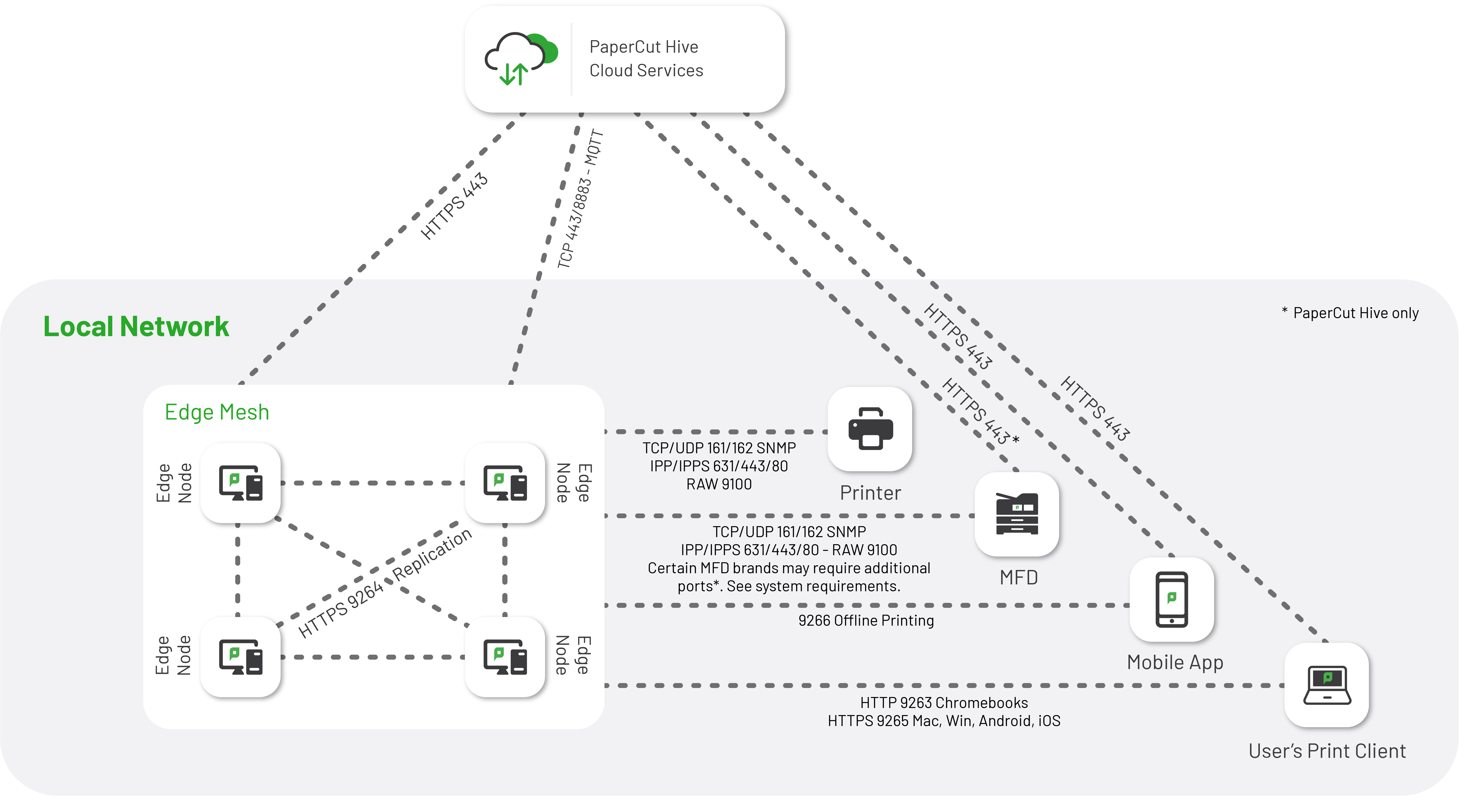
| 9263 | HTTP (encrypted payload) | ChromeOS | Edge node | For accepting print jobs from ChromeOS |
| 9264 | HTTPS | Windows, macOS, Android, iOS, edge node | Edge node | Job submission, Job replication, Pull a job from spooling edge node to processing edge node (Edge node with access to printer calls the edge node holding the job) |
| 9265 | HTTP | Windows, macOS, | Localhost | Local Port for PaperCut Printer |
| 9266 | HTTPS | Mobile app | Edge node | Job release in offline mode |
| 443/8883 | HTTPS/MQTT | Edge nodes and print clients | PaperCut cloud services | Cloud communication including sending notifications to the edge nodes and replication to the Cloud Node |
| 80/443/631 | IPP/IPPS | Edge node | Printers | IPP job submission, Printer discovery |
| 9100 | TCP | Edge Node | Printers | Print job delivery when using a manufacturer print driver |
| 161/162 | SNMP | Edge Node | Printers | Printer discovery and status monitoring |
PaperCut Hive embedded applications
- For Integrated Scanning:
- US data center:
send.papercut.com - UK data center:
uk.send.papercut.com - EU data center:
eu.send.papercut.com - AU data center:
au.send.papercut.com - CA data center:
ca.send.papercut.com
- US data center:
- Use a wildcard for the following URL:
- US data center:
\*.printerapp.papercut.com - UK data center:
\*.uk.printerapp.papercut.com - EU data center:
\*.eu.printerapp.papercut.com - AU data center:
\*.au.printerapp.papercut.com - CA data center:
\*.ca.papercut.com
- US data center:
Unable to use a wildcard for URLs? Discover platform-specific URLs
PaperCut Hive and Pocket Lite Release App MFD URLs
| MFD | Port | Protocol | Region | URL |
|---|---|---|---|---|
| Brother | 443 | HTTPS | United States Europe United Kingdom Australia Canada | brother-connect.printerapp.papercut.com Not available in this region Not available in this region Not available in this region Not available in this region |
| All other platforms | 443 | HTTPS | United States Europe United Kingdom Australia Canada | lite-release.printerapp.papercut.com lite-release.eu.printerapp.papercut.com lite-release.uk.printerapp.papercut.com lite-release.au.printerapp.papercut.com |
PaperCut Hive Full Release App MFD URLs
PaperCut Hive Lite Release App MFD firewall ports
| MFD | Port | Protocol | Port direction |
|---|---|---|---|
| Brother | 443 | HTTPS | Outbound |
| Epson | 443 | HTTPS | Outbound |
| Fuji Xerox | 443 | HTTPS | Outbound |
| Konica Minolta | 443 | HTTPS | Outbound |
| Sharp OSA | 443 | HTTPS | Outbound |
| Toshiba | 443 | HTTPS | Outbound |
| Xerox | 443 | HTTPS | Outbound |
PaperCut Hive Full Release App MFD firewall ports
| MFD | Port | Protocol | Port direction |
|---|---|---|---|
| Canon | 443 | HTTPS | Outbound |
| Epson | 443 | HTTPS | Outbound |
| Fujifilm | 443 | HTTPS | Outbound |
| Fujifilm LeSF | 443 | HTTPS | Outbound |
| Fuji Xerox | 443 | HTTPS | Outbound and Inbound*(from Edge Mesh to MFD)* |
| HP OXPd | 443/7627 | HTTPS | Outbound and Inbound*(from Edge Mesh to MFD)* |
| Konica Minolta | 443/50003 | HTTPS | Outbound and Inbound*(from Edge Mesh to MFD)* |
| Kyocera HyPAS | 443 | HTTPS | Outbound |
| Lexmark | 443 | HTTPS | Outbound |
| Ricoh SmartSDK | 443 | HTTPS | Outbound |
| Sharp OSA | 443/6080-6089 | HTTPS | Outbound and Inbound*(from Edge Mesh to MFD)* |
| Sharp LeSF | 443 | HTTPS | Outbound |
| Toshiba MDS v3 | 443/49630/ 50083 (or any customized port for scanning services) |
HTTPS | Outbound and Inbound*(from Edge Mesh to MFD) Inbound(from Edge Mesh to MFD)* |
| Toshiba LeSF | 443 | HTTPS | Outbound |
| Xerox | 443 | HTTPS | Outbound and Inbound*(from Edge Mesh to MFD) Inbound(from Edge Mesh to MFD)* |
| Xerox LeSF | 443 | HTTPS | Outbound |
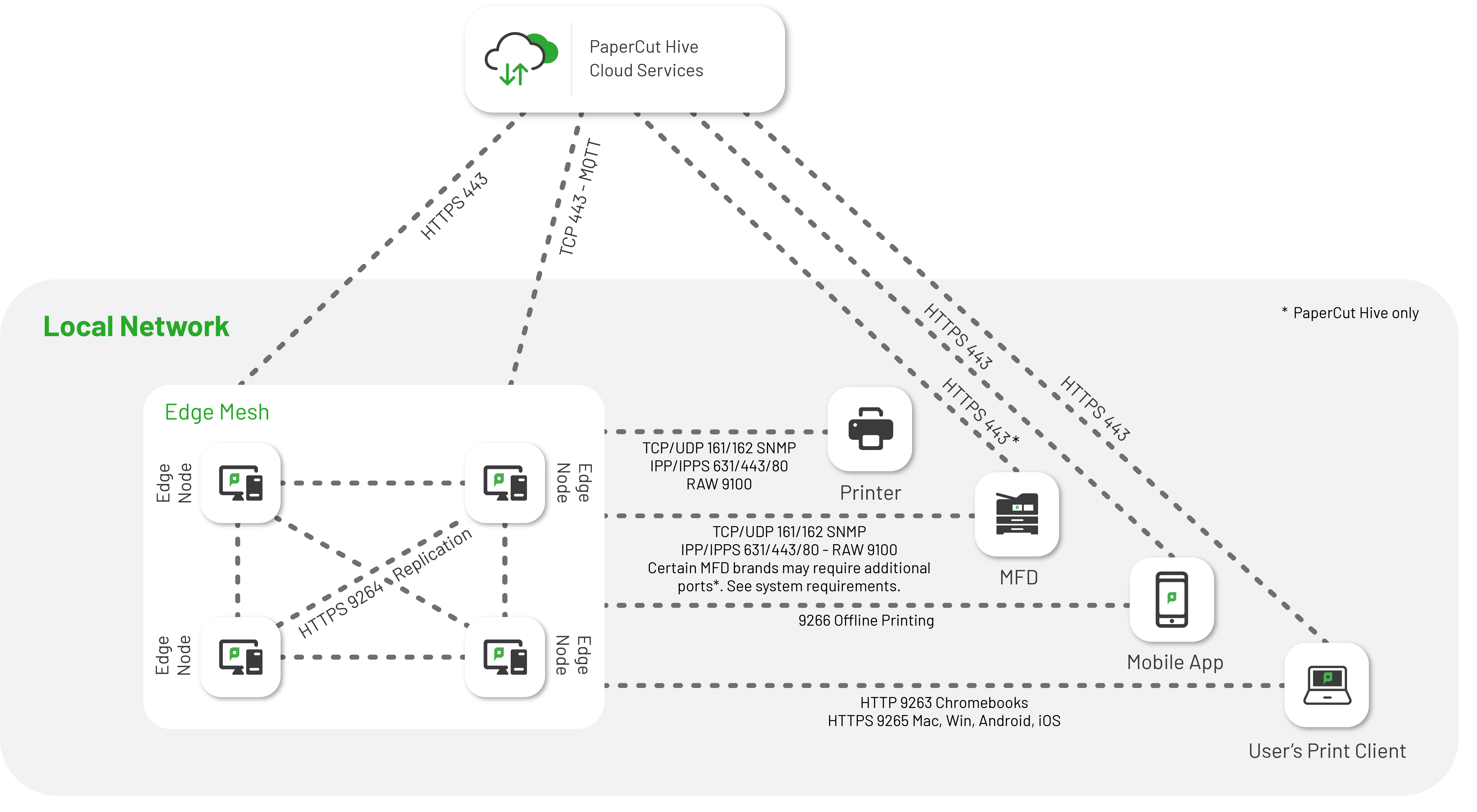
Network traffic diagram
This diagram shows network traffic flowing around a PaperCut Hive or Pocket environment.
Comments
Comments are not available in this preview environment. On papercut.com, this space shows the live Disqus comment thread for this page.