




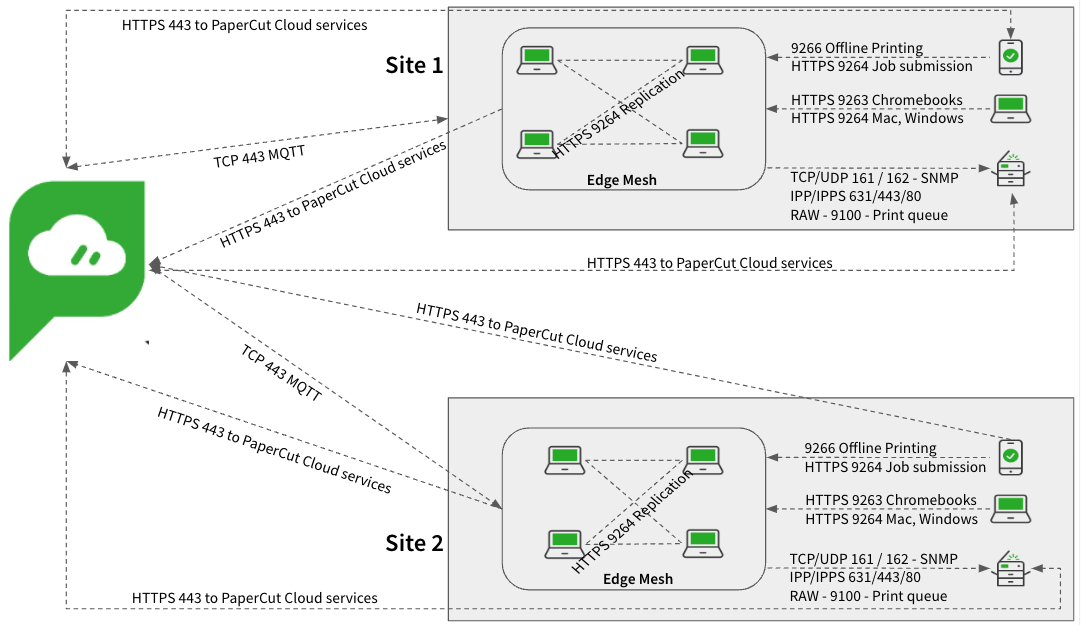
This page covers how PaperCut Hive and Pocket provide serverless cloud print management for organizations operating across multiple locations with no WAN connection between them. It outlines how each site can be accommodated as an independent network, with the Cloud Node optionally used to facilitate the secure routing of print jobs between each location without WAN interconnectivity.
Examples of multi-site environments with no WAN connection
Customers in these environments typically range from expanding medium-sized businesses with multiple offices to larger organizations. They often operate in the retail sector with multiple stores across a large geographical area.
These businesses commonly have a head office and several remote sites. To service the head offices, they might run a dedicated server environment and use business-class internet. The remote sites usually run a small subset of machines and a handful of printers and MFDs. These companies often invest heavily in SaaS solutions, enabling remote sites to operate with only an internet connection.
SaaS print management solutions such as PaperCut Hive and Pocket are ideal for these environments because they do not require dedicated print servers, they eliminate capital expenditure, and they offer simple software configuration.
Typical customers with this setup include:
- retail stores
- expanding small businesses
Recommended solution for printing in multi-site environments with no WAN connection
In these types of environments, you can generally treat each site as operating independently. PaperCut Hive or Pocket will store and route print jobs for release using only the devices located at the same site as the user who submitted the job.
Based on this, approach each site using one of the following guides, depending on the site’s specific network environment:
- For simple internet-only sites, refer to User printing onsite - no firewall port restrictions.
- For more complex sites, refer to User printing onsite - multi-subnet restricted network.
If users need to print a job at one site and release it at another site, enable the Cloud Node in the admin console. The Cloud Node securely relays print job data from one network to another without requiring a WAN connection.
How printing with PaperCut Hive and Pocket works
For detailed information on the print job submission and release processes for multiple sites not connected by a WAN, including ports and communications, refer to Job submission process and Find-Me job release process in the following guides:
- For simple internet-only sites, refer to User printing onsite - no firewall port restrictions.
- For more complex sites, refer to User printing onsite - multi-subnet restricted network.
If users need to print at one site and release the job at another site, you must enable the Cloud Node. That way, when jobs are printed, the system replicates them to the Cloud Node, and when the jobs are released to a printer at another location, they can be retrieved from the Cloud Node.
For supported MFDs with Pull Delivery enabled, the MFD retrieves jobs directly from the Cloud Node and prints them. For printers that do not support Pull Delivery, an edge node with access to the printer retrieves the job from the Cloud Node and submits it to the printer.
Pros and cons of Hive and Pocket in multi-site environments with no WAN connection
| Pros | Cons |
|---|---|
Print jobs remain local to each site. | For very small sites, there is less guarantee of an available edge node due to fewer computers. A Windows or macOS device must be available at a site to route print jobs for release unless all printers at that site support Pull Delivery. |
If you enable the Cloud Node, users can print a job at one site and release it at another site. |
Network diagram
Ports
If you run the Full Embedded Printer App, some MFD platforms need additional ports opened between edge nodes and the MFD to facilitate certain device tasks. For the complete list of ports, refer to System requirements.
Comments
Comments are not available in this preview environment. On papercut.com, this space shows the live Disqus comment thread for this page.