




What is the difference between a Restricted user and an Unrestricted user?
Users who are unrestricted will be able to accumulate a negative balance, e.g. their balance can go below zero, or if they have an overdraft, they can go beyond that.
By default, Filters & Restrictions on Print Queues are also not enforced for Unrestricted Users. You can override this by toggling the tick box found under the PaperCut admin interface, under Printers → [printer] → Filters & Restrictions → Restriction Scope.

Filters & Restrictions will still allow an Unrestricted user to accumulate a negative balance.
What determines whether a user is Restricted or Unrestricted?
To configure a user as restricted or unrestricted simply toggle the tick box found under the PaperCut admin interface, under Users → [username] → Account Details

Why would I want to restrict (or not restrict) users?
In educational organizations it might be determined that students have a monthly quota and can not use more than that unless they TopUp. Teachers and Staff however require unrestricted printing.
In this scenario students would be restricted with a monthly quota and staff would be unrestricted and accumulate a negative balance. The PaperCut Administrator would then use Scheduled Reports to keep an eye on staff usage.

How do I change user restriction settings if I already have my users set up?
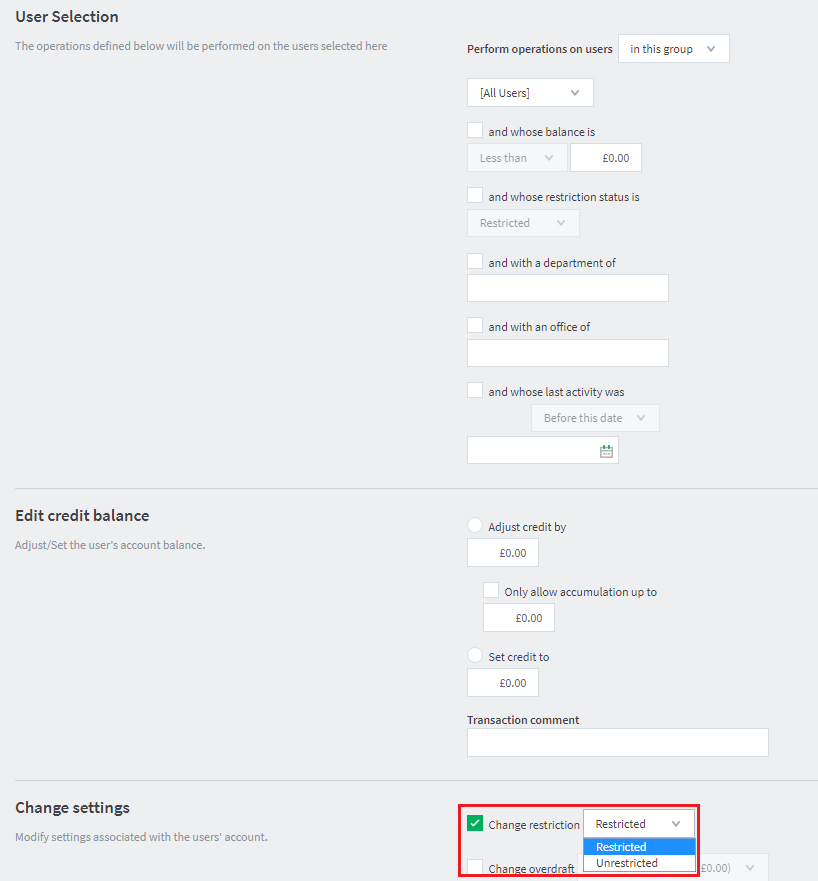
PaperCut’s Bulk User Actions enables you to select a Group of Users (or a list) and modify their Restricted status. This is accessed via the PaperCut Admin interface, under Users → Bulk User Actions.
How do I set user restrictions for new users?
New users will inherit a Restricted or Unrestricted attribute based on the New User Settings for any groups they’re in. If a user is in multiple groups and there is a combination of Restricted and Unrestricted settings they will be Unrestricted as a result - see Set new user creation rules (Handling multiple group membership).
Comments
Comments are not available in this preview environment. On papercut.com, this space shows the live Disqus comment thread for this page.