


Contents
- Overview
- Error: “Invalid email or password”
- Error: “You already have an account, enter your existing credentials and log in instead.”
- Error: “An account already exists with the same email address but different sign-in credentials.”
- Error: “Different account type - To continue, log in with an account and login method you’ve used before. Learn more about different account types”
- Error: “Your account does not have access to this organization.”
- Error: “Unable to process request due to missing initial state.”
- Error: “Could not find user…”
- Overview
- Error: “Invalid email or password”
- Error: “You already have an account, enter your existing credentials and log in instead.”
- Error: “An account already exists with the same email address but different sign-in credentials.”
- Error: “Different account type - To continue, log in with an account and login method you’ve used before. Learn more about different account types”
- Error: “Your account does not have access to this organization.”
- Error: “Unable to process request due to missing initial state.”
- Error: “Could not find user…”
Troubleshooting PaperCut Hive and Pocket login problems
This page applies to:


Last updated August 20, 2026
Contents
- Overview
- Error: “Invalid email or password”
- Error: “You already have an account, enter your existing credentials and log in instead.”
- Error: “An account already exists with the same email address but different sign-in credentials.”
- Error: “Different account type - To continue, log in with an account and login method you’ve used before. Learn more about different account types”
- Error: “Your account does not have access to this organization.”
- Error: “Unable to process request due to missing initial state.”
- Error: “Could not find user…”
- Overview
- Error: “Invalid email or password”
- Error: “You already have an account, enter your existing credentials and log in instead.”
- Error: “An account already exists with the same email address but different sign-in credentials.”
- Error: “Different account type - To continue, log in with an account and login method you’ve used before. Learn more about different account types”
- Error: “Your account does not have access to this organization.”
- Error: “Unable to process request due to missing initial state.”
- Error: “Could not find user…”
Are you trying to log in to the PaperCut Hive or Hive admin console, and you’re sure you’re using the right credentials, but still seeing an error when trying to log in? In this article, we unpack some of the scenarios that can cause this error.
Looking for the login address? Go to https://login.papercut.com/.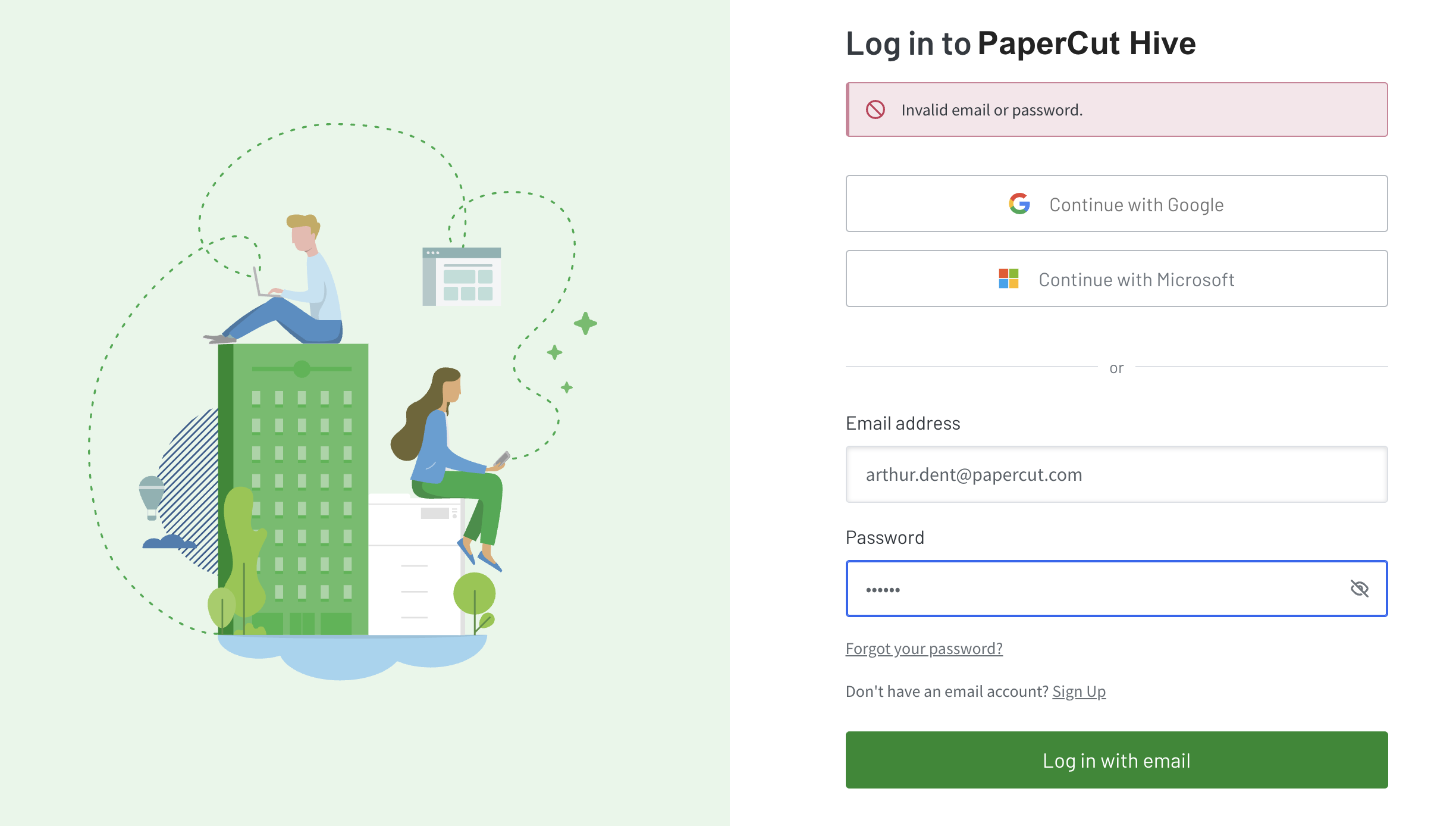
Error: “Invalid email or password”
One of the following should get you logged in.
Check the obvious
Make sure num-luck or Caps Lock isn’t on, and that you’re signing in with the correct email address.
Try resetting the password
Click the Forgot your password link on the page to try resetting the password. This should be an option if you initially signed up with email as opposed to the single sign-on methods using Microsoft or Google.
If the email was entered correctly, the following message might display:
Email does not exist or you have not created a password
Are you sure you entered the correct email? If so, you can register a new password.
In that case, the account was created via an email invitation. Select the Register a new password link in the error message and create a new password.
Use the same login method you signed up with
If you initially signed up using Google or Microsoft login, you won’t be able to log in with a username and password. Why? Email verification isn’t completed when signing up with Google or Microsoft. So, email and password logins only work if you signed up with Email & Password first.
Error: “You already have an account, enter your existing credentials and log in instead.”
This specific error is seen when trying to log in with a PaperCut Hive or Pocket administrator account that has the same email address as an existing printing user.
To resolve, ask another Hive or Pocket administrator account log in and delete the print user. Keep in mind that the print history for this user will be lost.
- Navigate to Users.
- Click the 3 dots next to the user in question and choose Delete.
- Then follow the normal process to invite the admin user.
Error: “An account already exists with the same email address but different sign-in credentials.”
When this occurs, users will be unable to log in to PaperCut Hive or Pocket.
The root cause is that the identify platform used by Hive or Pocket does not support account linking in certain scenarios.
This might happen if:
- If you initially signed in with Continue with Microsoft, and used the Personal account setting, you cannot now use the Work or school account option. You must continue to use the Personal account setting.
- If you previously signed up with the Email & password option, you cannot now link the account via a Microsoft 0Auth connection.
- If you signed up as an administrator with a Microsoft Personal account, then are invited as a user and sign up with Work or school account. This will fail as the email for the administrator account is linked to the Personal account.
To log in via a different method, you can remove both administrator and printing user accounts associated with the email address. Then re-invite the user so they can authenticate with their preferred account.
Error: “Different account type - To continue, log in with an account and login method you’ve used before. Learn more about different account types”
When this occurs, users will be unable to log in to PaperCut Hive or Pocket.
The root cause is that the identify platform used by Hive or Pocket does not support account linking in certain scenarios.
This might happen if:
- If you initially signed in with Continue with Microsoft, and used the Personal account setting, you cannot now use the Work or school account option. You must continue to use the Personal account setting.
- If you previously signed up with the Email & password option, you cannot now link the account via a Microsoft 0Auth connection.
- If you signed up as an administrator with a Microsoft Personal account, then are invited as a user and sign up with Work or school account. This will fail as the email for the administrator account is linked to the Personal account.
To login via a different method, you can remove both administrator and printing user accounts associated with the email address. Then re-invite the user so they can authenticate with their preferred account.
Error: “Your account does not have access to this organization.”
By default, when Microsoft Entra is used as the sync source, users are provisioned into PaperCut Hive/Pocket using the userPrincipalName (UPN) attribute.
However, in some environments where a mail attribute is present and populated, users may instead be synced using their mail address. This can create a mismatch during SAML SSO authentication if the SSO configuration is expecting the UPN, resulting in login failures or authentication errors.
To resolve this, ensure that the identifier used in both systems is consistent. Either:
- Align SAML SSO to authenticate using the same attribute that Entra is sending (UPN or mail), or
- Adjust the Entra sync configuration so that Hive/Pocket consistently uses the UPN as the primary identifier.
Keeping the same attribute across both provisioning and authentication flows is essential to prevent mismatches and ensure successful sign-in.
Error: “Unable to process request due to missing initial state.”
The full error may be something like: “Unable to process request due to missing initial state. This may happen if browser sessionStorage is inaccessible or accidentally cleared. Some specific scenarios are - 1) Using IDP-Initiated SAML SSO. 2) Using signInWithRedirect in a storage-partitioned browser environment.”
This error commonly occurs after configuring SAML SSO when a user tries to access Hive directly from the Identity Provider (IdP) dashboard.
PaperCut Hive/Pocket does not currently support IdP-initiated authentication. To sign in successfully, users need to access Hive/Pocket directly through the Hive/Pocket Portal instead of launching it from the IdP application tile.
A customer, however, provided a workaround for Microsoft MyApps.
"I’ve created a new enterprise app with Single Sign-on configured for ‘Linked Sign-on’ (not SAML), with the SP-initiated URL. That means our users can still visit the portal through MyApps."
Error: “Could not find user…”
An example of the error is shown below.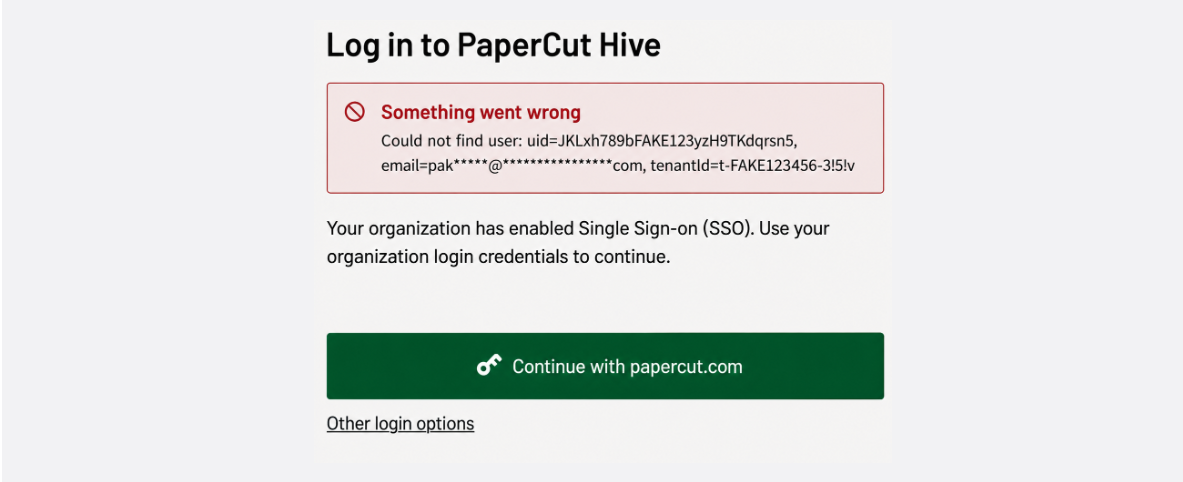
This error occurs when a user’s unique identifier (UID) cannot be matched to a user in PaperCut’s Google Identity Platform, indicating a potential data inconsistency that requires investigation on our cloud side.
To resolve, please submit a Technical Support Request and include the affected user’s email address. Once the ticket has been created, kindly attach a screenshot of the error so we can proceed with the investigation.
Category: PaperCut Pocket and Hive Articles
Subcategory: Pocket & Hive Troubleshooting Articles
Comments
Comments are not available in this preview environment. On papercut.com, this space shows the live Disqus comment thread for this page.