




PaperCut Hive is ready for Education and Enterprise
This beta project is now complete
The Percolator program for PaperCut Hive is ready for Education and Enterprise is now closed and has been released here.
Overview
Groups brings directory-driven print management to PaperCut Hive, giving K–12 schools, universities, and enterprises the automation and flexibility to manage users, printers, and policies at scale, while keeping Hive simple to deploy and manage.
In this first phase, Groups supports the Microsoft Entra ID and Google Workspace groups you already manage, making it easier to align print management with your existing organizational structure.
Key Hive features, including Quotas, Print Queue Deployment, and user onboarding, can be aligned to your directory structure, speeding up, reducing admin effort, and creating a more scalable print environment.
Through this Closed Beta Percolator, we’re gathering real-world feedback before general availability. Participants will get early access to Groups and help shape how it evolves and expands across Hive in future releases.
Who should test Groups?
If you are looking to fast-track onboarding, completely automate department moves, and ensure print queues drop into the right hands at the right time without manual intervention, Groups is built for you.
Closed Beta is ideal for partners and customers deploying PaperCut Hive in larger or more complex environments, including:
- K–12 schools
- Universities
- Enterprises with multiple departments or sites
- Organizations evaluating alternative cloud print solutions
- Existing MF customers considering a move to Hive
What we’re looking for from Closed Beta Participants
- Be willing to actively test Groups
- Share feedback early and often
- Report bugs or unexpected behavior
- Join occasional check-ins with the PaperCut team
- Help shape the future of Groups in Hive
Feature highlights at a glance
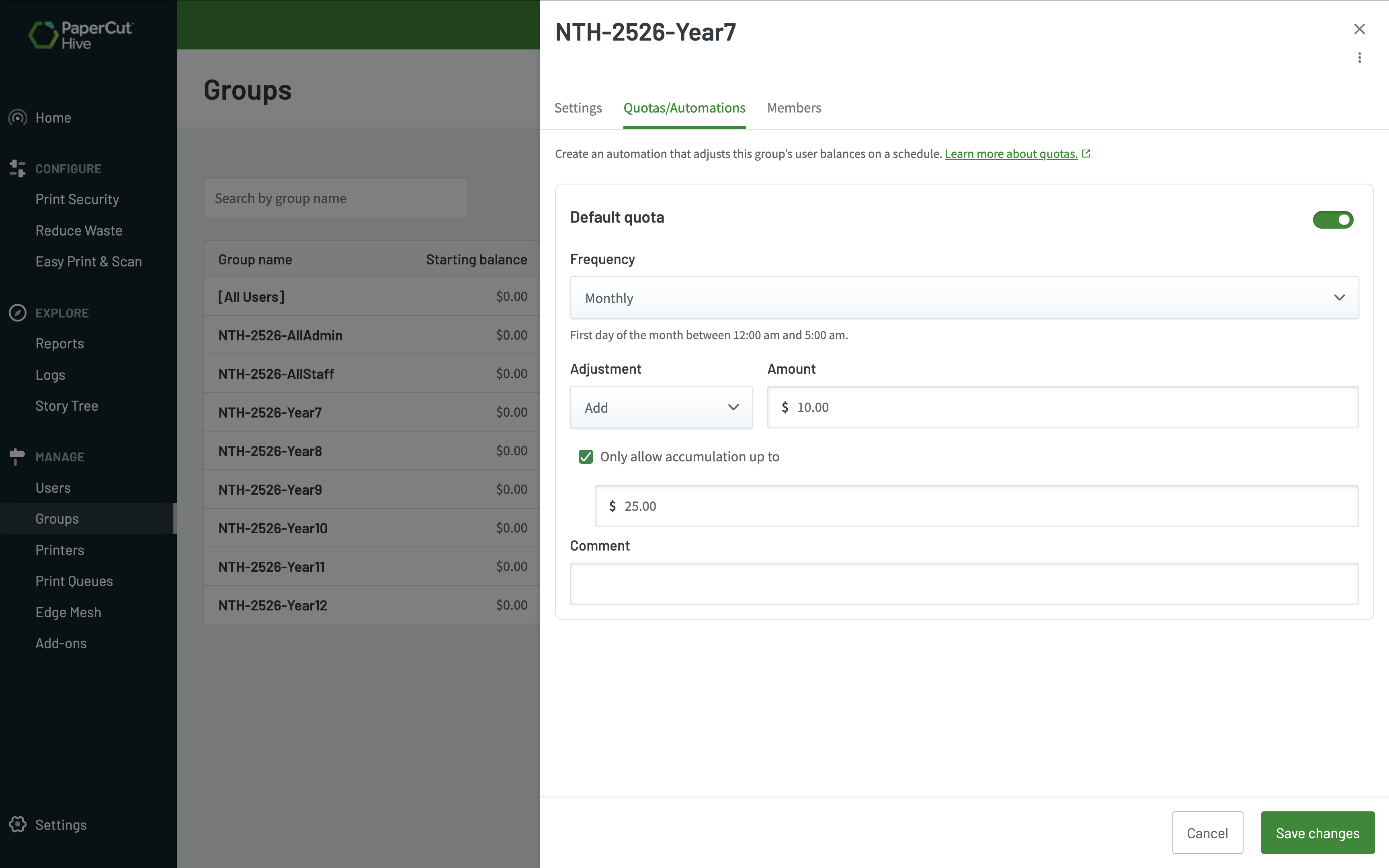
Import users and groups from Microsoft Entra ID or Google Workspace, map user attributes, and automatically reflect changes to users and group memberships so Hive stays aligned with your organizational structure.
Important: Groups require the new User and group sync capability. Existing User Sync Add-ons do not support Groups.
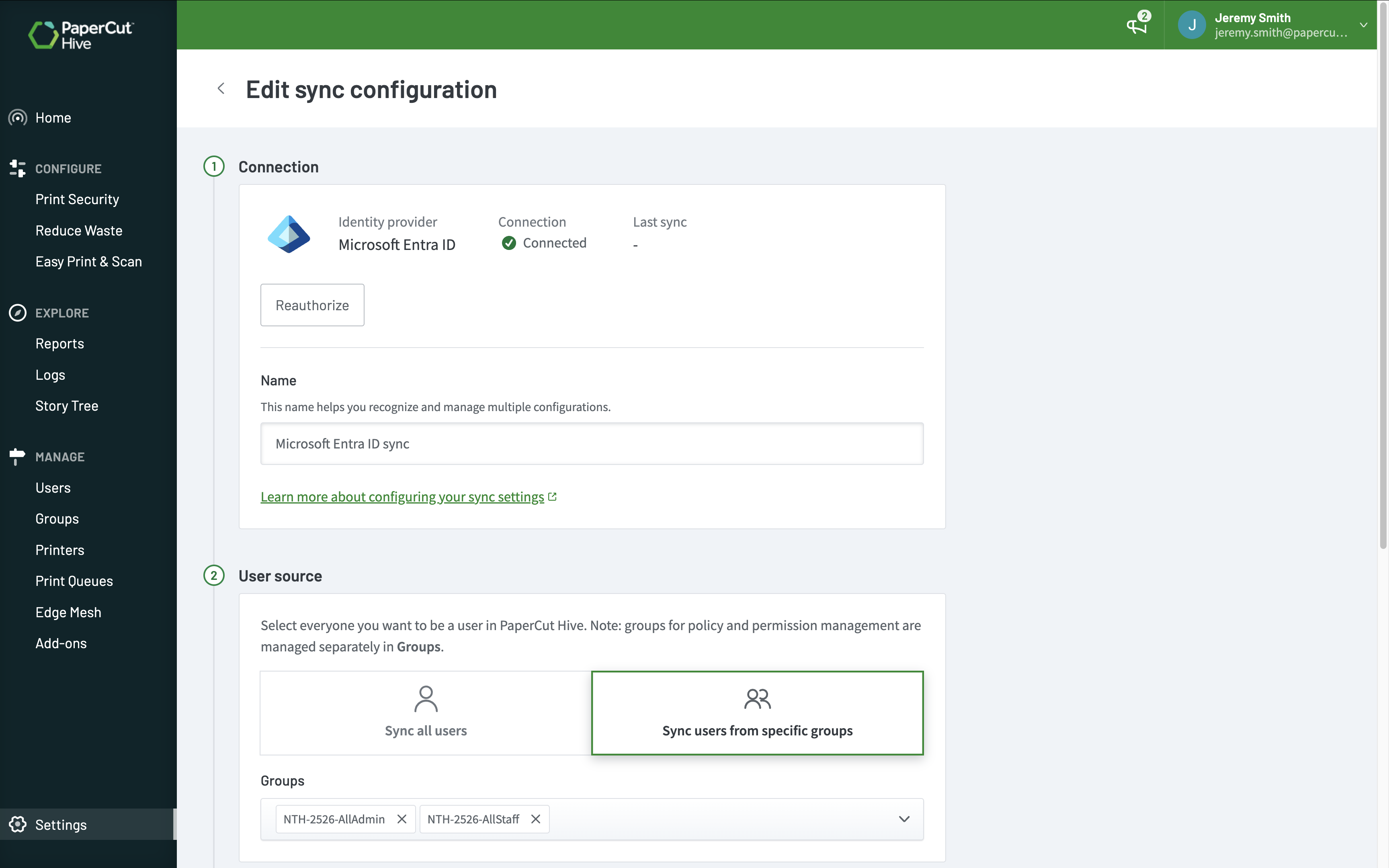
Print Queue Deployment becomes truly enterprise-ready
Groups turns Print Queue Deployment from a device-deployment tool into a dynamic provisioning system.
- New students automatically receive queues for their campus and year level
- Teachers moving schools instantly gain access to the correct printers
- Employees joining Finance automatically receive Finance printers
- Users changing departments no longer require IT intervention
No scripting. No GPOs. No manual reassignment. No ticketing overhead.
Groups closes a major gap and enables fully automated queue deployment based on organizational structure.
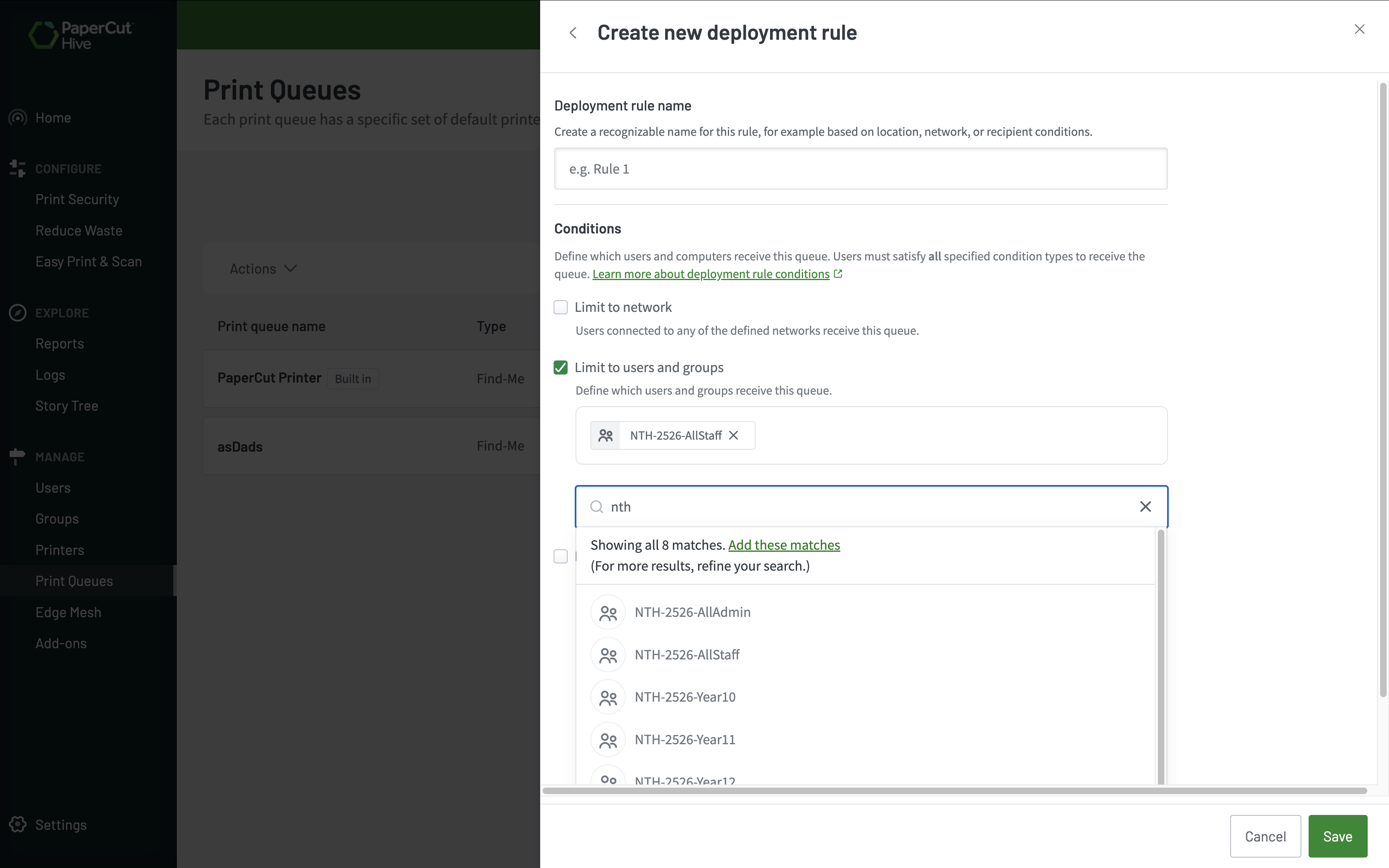
Quotas that work for education
Groups gives quotas real purpose by letting balances and replenishment schedules follow users automatically.
- Allocate annual allowances by year level
- Assign balances by faculty
- Top up staff accounts monthly
- Automatically adjust quotas when students move classes
This helps K–12 schools and higher education institutions manage quotas more efficiently, especially where print allowances are a core requirement.
Lightning-fast bulk actions
Send invites, change account balances, and run restriction updates across entire groups at once. No more one-by-one user management.
Departmental Reports
With new user and group sync APIs, sync departments directly from your existing directory for all users. Generate the reports from Hive admin console -> Reports -> Departments, to gain insights into print and job activity per department.
Common ways to use Groups
Education: A school managing students across multiple year levels can automatically assign quotas by grade, deploy printers to the right classrooms, and report on usage by department. All synced from their existing directory.
Enterprise: An organization with multiple departments can align print policies to their existing team structure, ensuring the right people have access to the right printers without any manual configuration.
V2 print queues:
- Education: Deploy default black-and-white, 2-sided print queues to students, while defaulting to color and 1-sided for staff, saving on toner and paper use.
- Education / Business: Deploy only Find-Me secure print release queues to HR and Legal, while deploying direct print queues to groups like reception, ensuring sensitive documents are only printed when the owner is at the printer, while enabling others to streamline their printing.
- Deploy specialty printers, such as wide-format printers, only to marketing or design user groups, ensuring only trained staff get access to expensive media.
Groups is one of the most important capabilities added to Hive to date. It enables automated print experiences expected in education and enterprise environments, significantly strengthening Print Queue Deployment’s positioning.
— PaperCut Product Team
How it works
-
Sign up for Closed Beta
-
Connect your directory (Microsoft Entra ID or Google Workspace)
-
Select the groups you want to manage
-
Apply Groups across Hive features like Quotas and Print Queue Deployment
Early Access includes support for:
- Print Queue Deployment
- Quotas
- User Restrictions
- Initial User Balances
Additional integrations, including print policies and reporting, are planned ahead of general availability.